Like I said, this is going to be pretty straight-forward chapter. To destroy the blocks, all we need to do is set their value to 0. And, since we have a list of blocks to destroy, we'll just use a simple FOR loop. The only thing we have to check is that the list contains more than one field. If not, the user clicked on a field that is not connected to any fields of the same color. Nothing fancy here. Here's the code (put it in your DestroyBlocks() method!):
// First, we'll check if the
// List contains more than
// one block. If it does, we
// destroy all the fields in
// it by setting their value
// to 0.
if (ConnectedList.Count > 1)
{
for (int d = 0;
d < ConnectedList.Count;
d++)
{
Field[ConnectedList[d].iXcoordinate,
ConnectedList[d].iYcoordinate] = 0;
}
}
Simple, right? So, if you remember the picture from the last chapter – here's how that field would look now, after destroying the selected blocks:

In the next chapter, we'll create some gravity. Gravity will force all those floating blocks to fall down. See the floating blocks? (Hint: Field[0,0], Field[0,1] and Field[1,0]). And after that, our game will be almost playable. When we finish gravity, we'll start working on different 'bonus' stuff, levels (like promissed), scoring (and high score lists), design and graphics, and a little 'Drop Block' feature wich will randomly create a single block somewhere in our game field… So, click on, and discover the secrets of Gravity!
This is the fun part. We have to move every column to the right. So, the idea is this: Player starts every new level with an empty game field. Before we give him a new column, we check if there's any space on the game field. If there's no space – it's Game Over! We try to push all of the columns one space to the right. We don't move empty columns. Oh, well, let me draw it:

So, this picture shows 15 columns. The white ones are empty. Colored ones contain at least one block. So, in this case, before we create and insert a new column, we have to move the green columns one space to the right. The blue and yellow columns will not be affected this time. Ok, one more:

The red column is the one we created after we moved the green columns to the right. In this example, before we could create a new column, we would have to moove all six columns to the right (I mean, blue ones, green ones, and the red one). And the finall product would look something like this (note, that the yellow columns were, once again, not moved):

I hope you get the idea now. To do this in our game, we'll have to look for the left-most empty column, and them move all preceeding columns one space right. To check if a column is empty, we'll just check the bottom block, since we'll add some gravity to the game at a later stage – meaning, no block could 'fly'. Ok, onto the code:
// Declare an integer that will hold
// the empty column number. We set it's
// value to –1, wich means there is NO
// empty columns. If we find an empty
// column, we'll change this value. We
// didn't use 0 to show that there's no
// empty columns, because 0 actualy refers
// to the FIRST column in our game field.
int iEmptyColumn = -1;
// Using a FOR loop to go trough all
// columns looking for an empty block.
for (int s = 0; s < iWidth; s++)
// Checking if the block is empty:
if (Field[iHeight - 1, s] == 0)
{
// We found the empty block. Write
// the column number into our
// integer variable.
iEmptyColumn = s;
// Exit the loop, we don't need to
// look any longer, since we already
// found an empty column:
break;
}
}
if (iEmptyColumn == -1)
{
// So, if there's no empty columns,
// we can't create any new ones, so
// we'll call the game over method.
GameOver();
}
else
{
// If we found an empty column, move all
// preeceding columns for one space to the
// right. We use two loops in this code
// because we have to move all blocks in
// the column (height wise), and all the
// collumns preeceding the empty one).
for (int x = iEmptyColumn; x > 0; x--)
{
for (int v = 0; v <>
{
Field[v, x] = Field[v, x - 1];
Field[v, x - 1] = 0;
}
}
// So, we moved our field, we can now
// create a new column...
CreateNewColumn();
// ...and add a random block
// (you'll see...) :)
DropBlock();
return;
}
What a progress! One of the last things is to put this stuff into our Timer's Tick event. Find the code for the game_tick event, and put this line there:
MoveRight();
Oh, yea, remove the line that we placed there earlier. (The one that called CreateNewColumn() method.) We don't need it, because now, we call the CreateNewColumn() method from our new MoveRight() method. In the next chapter we'll create the GameOver() method. And after that, we'll move to do some user (player) interaction stuff. I guess we'll be chasing the mouse all over the field… ;-P LOL, that's funny.
Try it out! You should see something like this:

Game Field!If you would buy a game of Monopoly in the 'real' world, you'd probably get a box, some playing figures, dice, bonus cards,property cards, game money, rule book and a game board. A lot of the similar stuff, like dice and game board, can be found in other 'regular' games. So, it would be logical to assume that computer games need similar 'components' to work. Yes, we'll make some of this stuff in our PC game. The first thing is to make a game board, or a game field, as I call it. Our game will use a big game field made of small fields. We'll create a field 15x10 in size. 15 columns and 10 rows. Each of the small game field blocks will hold one Block, Bubble, Baloon, whatever...
Here's the idea:

Ok, you probably get the idea now. Our game field is, basically, a bunch of blocks. Each block is defined with it's coordinates and a value (in this case, representing a speific color). So, how to make our empty form show something like this?
First add the next controls to the form:
(You can drag them from the tool box onto the empty form)
- Picture Box
- Button
Now we'll fine-tune some properties for our new controls. In the Properties window, on the left, there is a huge list of properties you can adjust. Click on your Form and and tweak the properties to the values shown in the next list:
Form - frmMain
- FormBorderStyle: FixedSingle
- MaximizeBox: False
- Size: 630; 470
- StartPosition: CenterScreen
- Text: My First Game
This will disable resizing of your form, set it's size and start position, and write 'My First Game' in the title bar. Ok, moving on - select the button, and set it's properties:
Button
- (name): butGame
- Location: 12; 6
- Size: 126; 53
- Text: New Game
And for the end, select the picture box and, again, set it's properties:
Picture Box
- (name): picGameField
- BackColor: Web>Transparent
- Location: 0; 65
- Size: 480; 320
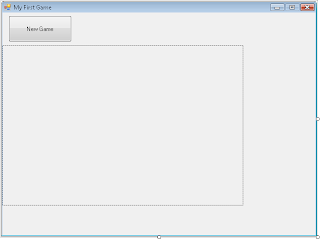
Your form should now look like this:
Don't forget to save your work!